Cactus: A Quirky Display Font with a Touch of Playfulness
Fonts are more than just tools for communication—they can shape the mood, tone, and personality of any design. Among the many display fonts available, Cactus stands out as a unique and expressive choice. With its whimsical curves and playful structure, Cactus is ideal for adding character to creative projects. Whether you're designing logos, crafting invitations, or working on digital content, this font brings a sense of fun and authenticity that's hard to ignore.
The Charm of Cactus
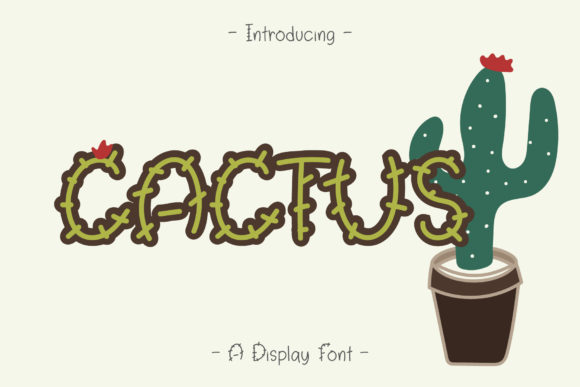
Cactus is a display font that captures the essence of playfulness and creativity. Its name hints at the spiky, yet vibrant nature of the desert plant, and the font itself reflects that energy. The letterforms are rounded, with subtle spikes and flourishes that give them a distinct identity. This makes Cactus especially suitable for designs that aim to stand out while maintaining an approachable feel.
What sets Cactus apart is its ability to blend charm with clarity. Even though it's a decorative font, it remains legible when used appropriately. This balance ensures that it can be used in a variety of contexts without sacrificing readability.
Key Features of Cactus
- Playful Design: The font's unique curves and small details make it visually engaging.
- Versatile Application: From branding to personal projects, Cactus offers flexibility in use.
- High Legibility: Despite its quirky style, Cactus maintains good readability when used in larger sizes.
- Complementary Extras: Often comes with additional elements like icons or illustrations to enhance creative projects.
Who Can Benefit from Using Cactus?
Cactus is not limited to a specific audience—it appeals to a wide range of users, including designers, artists, business owners, and hobbyists. Here are some scenarios where Cactus shines:
For Designers: Cactus adds a touch of personality to web and print designs. It works well for headlines, banners, and call-to-action buttons that need to grab attention.
For Business Owners: If you're looking to create a brand identity that feels friendly and modern, Cactus can help convey that vibe. It’s perfect for logos, social media posts, and promotional materials.
For Creators and Crafters: Those who enjoy DIY projects, such as card making, scrapbooking, or handmade packaging, will find Cactus to be a delightful addition to their toolkit. The font’s cute extras can elevate the visual appeal of these crafts.
For Online Users: Anyone creating content online—whether it's blog posts, YouTube thumbnails, or Instagram captions—can benefit from using Cactus to add a unique flair to their text.
Real-World Applications of Cactus
- Branding and Logos: Use Cactus for logo designs that want to express a fun and approachable brand image.
- Event Invitations: Create eye-catching invitations for parties, weddings, or events with Cactus as the main font.
- Children's Products: The font's playful nature makes it ideal for children's books, toys, or educational materials.
- Digital Content: Apply Cactus to website headers, app interfaces, or video titles to add a sense of whimsy.
- Personal Projects: Use it in greeting cards, birthday messages, or custom calendars to add a personal touch.
Evaluating Cactus for Your Needs
While Cactus is a fantastic font for many applications, it's important to consider whether it suits your particular project. Here are some factors to keep in mind:
Legibility Considerations: Although Cactus is readable in large sizes, it may not be the best choice for long paragraphs of text. It's more suited for short, impactful statements or headings.
Design Compatibility: Ensure that Cactus complements the overall aesthetic of your design. It pairs well with clean, minimalist layouts but might clash with overly complex backgrounds.
Font Licensing: Always check the licensing terms before using Cactus commercially. Some fonts require attribution or have restrictions on usage.
File Formats: Make sure the font is available in the necessary formats (such as .ttf or .otf) for your design software or platform.
Strengths and Limitations
Strengths:
- Unique and memorable design
- Highly versatile across multiple platforms
- Good for both digital and print use
- Easy to integrate into creative workflows
Limitations:
- Not ideal for body text due to its decorative nature
- May require customization for certain languages or characters
- Limited availability in some font libraries
Getting Started with Cactus
If you're ready to explore what Cactus has to offer, here are a few steps to help you get started:
- Find the Font: Search for Cactus in popular font repositories like Google Fonts, Adobe Fonts, or Font Squirrel.
- Preview the Font: Before downloading, preview how Cactus looks in different sizes and colors to ensure it meets your needs.
- Download and Install: Once you've found a suitable version, download and install the font on your device or design software.
- Experiment with Designs: Try using Cactus in various projects to see how it enhances your work.
- Seek Feedback: Share your designs with others to gather insights on how well Cactus works in different contexts.
Final Thoughts on Cactus
Cactus is more than just a font—it's a creative tool that can bring life to your designs. Its playful yet functional style makes it a great choice for those looking to add a touch of personality to their work. Whether you're a professional designer or a casual creator, Cactus offers something special that can elevate your projects.
As with any design element, the key is to use Cactus thoughtfully and purposefully. When used correctly, it can become a signature part of your visual identity, helping you stand out in a crowded digital landscape.